
Fixed window approach
Alexander Häußer
September 2026
Source:vignettes/vignette_02_hourly_fixed.Rmd
vignette_02_hourly_fixed.RmdThe package tscv provides helper functions for time
series analysis, forecasting and time series cross-validation. It is
mainly designed to work with the tidy forecasting ecosystem, especially
the packages tsibble, fable,
fabletools and feasts.
In this vignette, we demonstrate a fixed window approach for time series cross-validation using hourly day-ahead electricity spot prices.
Installation
You can install the stable version from CRAN:
install.packages("tscv")You can install the development version from GitHub:
# install.packages("devtools")
devtools::install_github("ahaeusser/tscv")Data preparation
The data set elec_price is a tibble with
day-ahead electricity spot prices in [EUR/MWh] from the ENTSO-E
Transparency Platform. The data set contains hourly time series data
from 2019-01-01 to 2020-12-31 for eight European bidding zones:
-
DE: Germany, including Luxembourg -
DK: Denmark -
ES: Spain -
FI: Finland -
FR: France -
NL: Netherlands -
NO1: Norway 1, Oslo -
SE1: Sweden 1, Lulea
In this vignette, we use four bidding zones to demonstrate the functionality of the package: Germany, France, Norway 1 and Sweden 1.
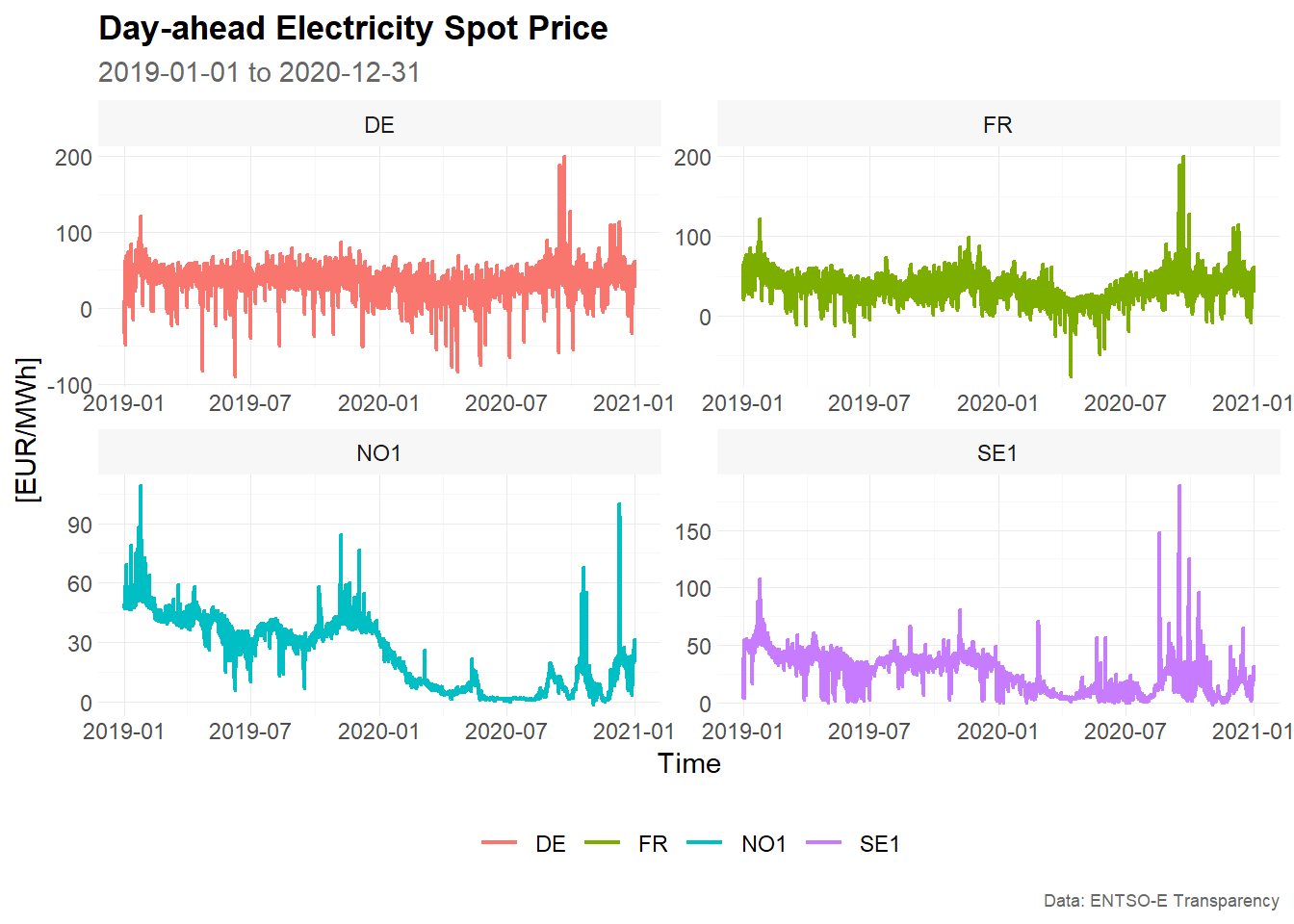
The function plot_line() is used to visualize the time
series. The function summarise_data() explores the
structure of the data, including the start date, end date, number of
observations, number of missing values and number of zero values. The
function summarise_stats() calculates descriptive
statistics for each time series.
series_id = "bidding_zone"
value_id = "value"
index_id = "time"

context <- list(
  series_id = series_id,
  value_id = value_id,
  index_id = index_id
)

# Prepare data set
main_frame <- elec_price %>%
  filter(bidding_zone %in% c("DE", "FR", "NO1", "SE1"))

main_frame
#> # A tibble: 70,176 × 5
#>    time                item            unit      bidding_zone  value
#>    <dttm>              <chr>           <chr>     <chr>         <dbl>
#>  1 2019-01-01 00:00:00 Day-ahead Price [EUR/MWh] DE            10.1
#>  2 2019-01-01 01:00:00 Day-ahead Price [EUR/MWh] DE            -4.08
#>  3 2019-01-01 02:00:00 Day-ahead Price [EUR/MWh] DE            -9.91
#>  4 2019-01-01 03:00:00 Day-ahead Price [EUR/MWh] DE            -7.41
#>  5 2019-01-01 04:00:00 Day-ahead Price [EUR/MWh] DE           -12.6
#>  6 2019-01-01 05:00:00 Day-ahead Price [EUR/MWh] DE           -17.2
#>  7 2019-01-01 06:00:00 Day-ahead Price [EUR/MWh] DE           -15.1
#>  8 2019-01-01 07:00:00 Day-ahead Price [EUR/MWh] DE            -4.93
#>  9 2019-01-01 08:00:00 Day-ahead Price [EUR/MWh] DE            -6.33
#> 10 2019-01-01 09:00:00 Day-ahead Price [EUR/MWh] DE            -4.93
#> # ℹ 70,166 more rows

main_frame %>%
  plot_line(
    x = time,
    y = value,
    color = bidding_zone,
    facet_var = bidding_zone,
    title = "Day-ahead Electricity Spot Price",
    subtitle = "2019-01-01 to 2020-12-31",
    xlab = "Time",
    ylab = "[EUR/MWh]",
    caption = "Data: ENTSO-E Transparency"
    )
summarise_data(
  .data = main_frame,
  context = context
)
#> # A tibble: 4 × 8
#>   bidding_zone start               end                 n_obs n_missing
#>   <chr>        <dttm>              <dttm>              <int>     <int>
#> 1 DE           2019-01-01 00:00:00 2020-12-31 23:00:00 17544         0
#> 2 FR           2019-01-01 00:00:00 2020-12-31 23:00:00 17544         0
#> 3 NO1          2019-01-01 00:00:00 2020-12-31 23:00:00 17544         0
#> 4 SE1          2019-01-01 00:00:00 2020-12-31 23:00:00 17544         0
#> # ℹ 3 more variables: pct_missing <dbl>, n_zeros <int>, pct_zeros <dbl>

summarise_stats(
  .data = main_frame,
  context = context
)
#> # A tibble: 4 × 11
#>   bidding_zone  mean median  mode    sd     p0   p25   p75  p100 skewness
#>   <chr>        <dbl>  <dbl> <dbl> <dbl>  <dbl> <dbl> <dbl> <dbl>    <dbl>
#> 1 DE            34.1   35.1 35.9   16.9 -90.0  26.3   43.8  200.   -0.776
#> 2 FR            35.8   36   37.2   15.5 -75.8  26.6   44.9  200.    0.323
#> 3 NO1           24.3   26.9  2.66  17.1  -1.73  6.95  38.8  109.    0.189
#> 4 SE1           26.1   27.9 37.9   15.9  -1.73 11.4   38.5  189.    0.378
#> # ℹ 1 more variable: kurtosis <dbl>
Split data into training and testing
To prepare the data for time series cross-validation, we use the
function make_split(). This function partitions the data
into several training and testing slices.
The argument mode controls the type of rolling-origin
resampling:
-
mode = "stretch"creates an expanding window. -
mode = "slide"creates a fixed window.
In a fixed window approach, the size of the training sample remains constant over time. After each split, the training window moves forward by a fixed number of observations. Older observations drop out of the training sample and newer observations are added. This is useful when the most recent observations are expected to be more relevant than older observations, or when the data-generating process may change over time.
In this vignette, we use:
-
value = 2400: each training window contains 2,400 hourly observations -
n_ahead = 24: each test set contains 24 observations, corresponding to a 24-hour-ahead forecast horizon -
n_skip = 23: after each split, the rolling origin is advanced by 24 hours, which creates non-overlapping test windows -
mode = "slide": the training window slides forward while keeping a fixed size
The argument exceed = FALSE ensures that only pseudo
out-of-sample forecasts are generated. In other words, test windows are
only created if the corresponding observations are available in the
data.
# Setup for time series cross validation
type = "first"
value = 2400      # size for training window
n_ahead = 24      # size for testing window (= forecast horizon)
n_skip = 23       # skip 23 observations
n_lag = 0         # no lag
mode = "slide"    # fixed window approach
exceed = FALSE    # only pseudo out-of-sample forecast

split_frame <- make_split(
  main_frame = main_frame,
  context = context,
  type = type,
  value = value,
  n_ahead = n_ahead,
  n_skip = n_skip,
  n_lag = n_lag,
  mode = mode,
  exceed = exceed
)

# For illustration, only the first 50 splits are used
split_frame <- split_frame %>%
  filter(split %in% c(1:50))

split_frame
#> # A tibble: 200 × 4
#>    bidding_zone split train         test
#>    <chr>        <int> <list>        <list>
#>  1 DE               1 <int [2,400]> <int [24]>
#>  2 DE               2 <int [2,400]> <int [24]>
#>  3 DE               3 <int [2,400]> <int [24]>
#>  4 DE               4 <int [2,400]> <int [24]>
#>  5 DE               5 <int [2,400]> <int [24]>
#>  6 DE               6 <int [2,400]> <int [24]>
#>  7 DE               7 <int [2,400]> <int [24]>
#>  8 DE               8 <int [2,400]> <int [24]>
#>  9 DE               9 <int [2,400]> <int [24]>
#> 10 DE              10 <int [2,400]> <int [24]>
#> # ℹ 190 more rows
The resulting object split_frame contains one row per
time series and split. The columns train and
test are list-columns containing the row positions used for
the training and test samples.
Because mode = "slide" is used, each training set has
the same length of 2,400 observations. The first split uses the first
2,400 observations for training and the following 24 observations for
testing. The next split moves the training window forward by 24 hours.
The training sample still contains 2,400 observations, but the oldest 24
observations are dropped and the next 24 observations are added.
Only the first 50 splits are used in this vignette to keep the example computationally manageable.
Training and forecasting
The training and test splits are prepared within
split_frame, and we are now ready for forecasting. The
function slice_train() extracts the training observations
from main_frame according to the row positions stored in
split_frame.
Since the forecasting models are estimated with functions from
fable and fabletools, the training data is
converted from a tibble to a tsibble. The key
consists of the bidding zone and the split number, so each model is
estimated separately for each bidding zone and each rolling-origin
split.
Due to the sample size and computation time, this vignette uses simple benchmark methods:
-
SNAIVE: seasonal naive model with weekly seasonality -
STL-NAIVE: STL decomposition model combined with a naive forecast of the seasonally adjusted series -
SNAIVE2: variation of the seasonal naive approach; Mondays, Saturdays and Sundays are treated with a weekly lag, while Tuesdays, Wednesdays, Thursdays and Fridays are treated with a daily lag -
SMEDIAN: seasonal median model
The functions SNAIVE2() and SMEDIAN() are
extensions to the fable package provided by
tscv.
# Slice training data from main_frame according to split_frame
train_frame <- slice_train(
  main_frame = main_frame,
  split_frame = split_frame,
  context = context
  )

train_frame
#> # A tibble: 480,000 × 6
#>    time                item            unit      bidding_zone  value split
#>    <dttm>              <chr>           <chr>     <chr>         <dbl> <int>
#>  1 2019-01-01 00:00:00 Day-ahead Price [EUR/MWh] DE            10.1      1
#>  2 2019-01-01 01:00:00 Day-ahead Price [EUR/MWh] DE            -4.08     1
#>  3 2019-01-01 02:00:00 Day-ahead Price [EUR/MWh] DE            -9.91     1
#>  4 2019-01-01 03:00:00 Day-ahead Price [EUR/MWh] DE            -7.41     1
#>  5 2019-01-01 04:00:00 Day-ahead Price [EUR/MWh] DE           -12.6      1
#>  6 2019-01-01 05:00:00 Day-ahead Price [EUR/MWh] DE           -17.2      1
#>  7 2019-01-01 06:00:00 Day-ahead Price [EUR/MWh] DE           -15.1      1
#>  8 2019-01-01 07:00:00 Day-ahead Price [EUR/MWh] DE            -4.93     1
#>  9 2019-01-01 08:00:00 Day-ahead Price [EUR/MWh] DE            -6.33     1
#> 10 2019-01-01 09:00:00 Day-ahead Price [EUR/MWh] DE            -4.93     1
#> # ℹ 479,990 more rows

# Convert tibble to tsibble
train_frame <- train_frame %>%
  as_tsibble(
    index = time,
    key = c(bidding_zone, split)
    )

train_frame
#> # A tsibble: 480,000 x 6 [1h] <UTC>
#> # Key:       bidding_zone, split [200]
#>    time                item            unit      bidding_zone  value split
#>    <dttm>              <chr>           <chr>     <chr>         <dbl> <int>
#>  1 2019-01-01 00:00:00 Day-ahead Price [EUR/MWh] DE            10.1      1
#>  2 2019-01-01 01:00:00 Day-ahead Price [EUR/MWh] DE            -4.08     1
#>  3 2019-01-01 02:00:00 Day-ahead Price [EUR/MWh] DE            -9.91     1
#>  4 2019-01-01 03:00:00 Day-ahead Price [EUR/MWh] DE            -7.41     1
#>  5 2019-01-01 04:00:00 Day-ahead Price [EUR/MWh] DE           -12.6      1
#>  6 2019-01-01 05:00:00 Day-ahead Price [EUR/MWh] DE           -17.2      1
#>  7 2019-01-01 06:00:00 Day-ahead Price [EUR/MWh] DE           -15.1      1
#>  8 2019-01-01 07:00:00 Day-ahead Price [EUR/MWh] DE            -4.93     1
#>  9 2019-01-01 08:00:00 Day-ahead Price [EUR/MWh] DE            -6.33     1
#> 10 2019-01-01 09:00:00 Day-ahead Price [EUR/MWh] DE            -4.93     1
#> # ℹ 479,990 more rows

# Model training via fabletools::model()
model_frame <- train_frame %>%
  model(
    "SNAIVE" = SNAIVE(value ~ lag("week")),
    "STL-NAIVE" = decomposition_model(STL(value), NAIVE(season_adjust)),
    "SNAIVE2" = SNAIVE2(value),
    "SMEDIAN" = SMEDIAN(value ~ lag("week"))
    )

model_frame
#> # A mable: 200 x 6
#> # Key:     bidding_zone, split [200]
#>    bidding_zone split   SNAIVE               `STL-NAIVE`   SNAIVE2   SMEDIAN
#>    <chr>        <int>  <model>                   <model>   <model>   <model>
#>  1 DE               1 <SNAIVE> <STL decomposition model> <SNAIVE2> <SMEDIAN>
#>  2 DE               2 <SNAIVE> <STL decomposition model> <SNAIVE2> <SMEDIAN>
#>  3 DE               3 <SNAIVE> <STL decomposition model> <SNAIVE2> <SMEDIAN>
#>  4 DE               4 <SNAIVE> <STL decomposition model> <SNAIVE2> <SMEDIAN>
#>  5 DE               5 <SNAIVE> <STL decomposition model> <SNAIVE2> <SMEDIAN>
#>  6 DE               6 <SNAIVE> <STL decomposition model> <SNAIVE2> <SMEDIAN>
#>  7 DE               7 <SNAIVE> <STL decomposition model> <SNAIVE2> <SMEDIAN>
#>  8 DE               8 <SNAIVE> <STL decomposition model> <SNAIVE2> <SMEDIAN>
#>  9 DE               9 <SNAIVE> <STL decomposition model> <SNAIVE2> <SMEDIAN>
#> 10 DE              10 <SNAIVE> <STL decomposition model> <SNAIVE2> <SMEDIAN>
#> # ℹ 190 more rows

# Forecasting via fabletools::forecast()
fable_frame <- model_frame %>%
  forecast(h = n_ahead)

fable_frame
#> # A fable: 19,200 x 6 [1h] <UTC>
#> # Key:     bidding_zone, split, .model [800]
#>    bidding_zone split .model time
#>    <chr>        <int> <chr>  <dttm>
#>  1 DE               1 SNAIVE 2019-04-11 00:00:00
#>  2 DE               1 SNAIVE 2019-04-11 01:00:00
#>  3 DE               1 SNAIVE 2019-04-11 02:00:00
#>  4 DE               1 SNAIVE 2019-04-11 03:00:00
#>  5 DE               1 SNAIVE 2019-04-11 04:00:00
#>  6 DE               1 SNAIVE 2019-04-11 05:00:00
#>  7 DE               1 SNAIVE 2019-04-11 06:00:00
#>  8 DE               1 SNAIVE 2019-04-11 07:00:00
#>  9 DE               1 SNAIVE 2019-04-11 08:00:00
#> 10 DE               1 SNAIVE 2019-04-11 09:00:00
#> # ℹ 19,190 more rows
#> # ℹ 2 more variables: value <dist>, .mean <dbl>

# Convert fable_frame (fable) to future_frame (tibble)
future_frame <- make_future(
  fable = fable_frame,
  context = context
  )

future_frame
#> # A tibble: 19,200 × 6
#>    time                bidding_zone model  split horizon point
#>    <dttm>              <chr>        <chr>  <int>   <int> <dbl>
#>  1 2019-04-11 00:00:00 DE           SNAIVE     1       1  33
#>  2 2019-04-11 01:00:00 DE           SNAIVE     1       2  32.6
#>  3 2019-04-11 02:00:00 DE           SNAIVE     1       3  34.1
#>  4 2019-04-11 03:00:00 DE           SNAIVE     1       4  36.9
#>  5 2019-04-11 04:00:00 DE           SNAIVE     1       5  44.7
#>  6 2019-04-11 05:00:00 DE           SNAIVE     1       6  53.6
#>  7 2019-04-11 06:00:00 DE           SNAIVE     1       7  59.9
#>  8 2019-04-11 07:00:00 DE           SNAIVE     1       8  46.9
#>  9 2019-04-11 08:00:00 DE           SNAIVE     1       9  48
#> 10 2019-04-11 09:00:00 DE           SNAIVE     1      10  47
#> # ℹ 19,190 more rows
The object model_frame is a model table, or
mable. Each row corresponds to one combination of bidding
zone and split. Each model is stored in a separate column.
The forecasts are created with forecast(h = n_ahead),
which produces 24 hourly forecasts for each model, bidding zone and
split. The function make_future() converts the resulting
fable object into a regular tibble that can be
used by the evaluation functions in tscv.
Evaluation of forecast accuracy
To evaluate forecast accuracy, we use the function
make_accuracy(). This function compares the forecasts in
future_frame with the observed values in
main_frame.
Accuracy can be evaluated along different dimensions:
-
dimension = "horizon"summarizes forecast errors by forecast horizon. This shows how forecast accuracy changes from 1-step-ahead to 24-step-ahead forecasts. -
dimension = "split"summarizes forecast errors by rolling-origin split. This shows whether some forecast origins are more difficult than others.
Several accuracy metrics are available:
-
ME: mean error -
MAE: mean absolute error -
MSE: mean squared error -
RMSE: root mean squared error -
MAPE: mean absolute percentage error -
sMAPE: symmetric mean absolute percentage error -
MPE: mean percentage error -
rMAE: relative mean absolute error, relative to a user-defined benchmark method
Forecast accuracy by forecast horizon
Accuracy by forecast horizon is useful for understanding how forecast performance changes as the forecast horizon increases. For example, short-term electricity price forecasts may be more accurate for the next few hours than for later hours of the following day.
# Estimate accuracy metrics by forecast horizon
accuracy_horizon <- make_accuracy(
  future_frame = future_frame,
  main_frame = main_frame,
  context = context,
  dimension = "horizon"
)

accuracy_horizon
#> # A tibble: 2,688 × 6
#>    bidding_zone model   dimension     n metric value
#>    <chr>        <chr>   <chr>     <int> <chr>  <dbl>
#>  1 DE           SMEDIAN horizon       1 MAE     4.84
#>  2 DE           SMEDIAN horizon       2 MAE     5.05
#>  3 DE           SMEDIAN horizon       3 MAE     4.85
#>  4 DE           SMEDIAN horizon       4 MAE     4.50
#>  5 DE           SMEDIAN horizon       5 MAE     6.73
#>  6 DE           SMEDIAN horizon       6 MAE     6.66
#>  7 DE           SMEDIAN horizon       7 MAE     6.40
#>  8 DE           SMEDIAN horizon       8 MAE     6.73
#>  9 DE           SMEDIAN horizon       9 MAE     7.38
#> 10 DE           SMEDIAN horizon      10 MAE     9.06
#> # ℹ 2,678 more rows

# Visualize results
accuracy_horizon %>%
  filter(metric == "MAE") %>%
  plot_line(
    x = n,
    y = value,
    facet_var = bidding_zone,
    facet_nrow = 1,
    color = model,
    title = "Evaluation of forecast accuracy by forecast horizon",
    subtitle = "Mean absolute error (MAE)",
    xlab = "Forecast horizon (n-step-ahead)",
    caption = "Data: ENTSO-E Transparency, own calculation"
    )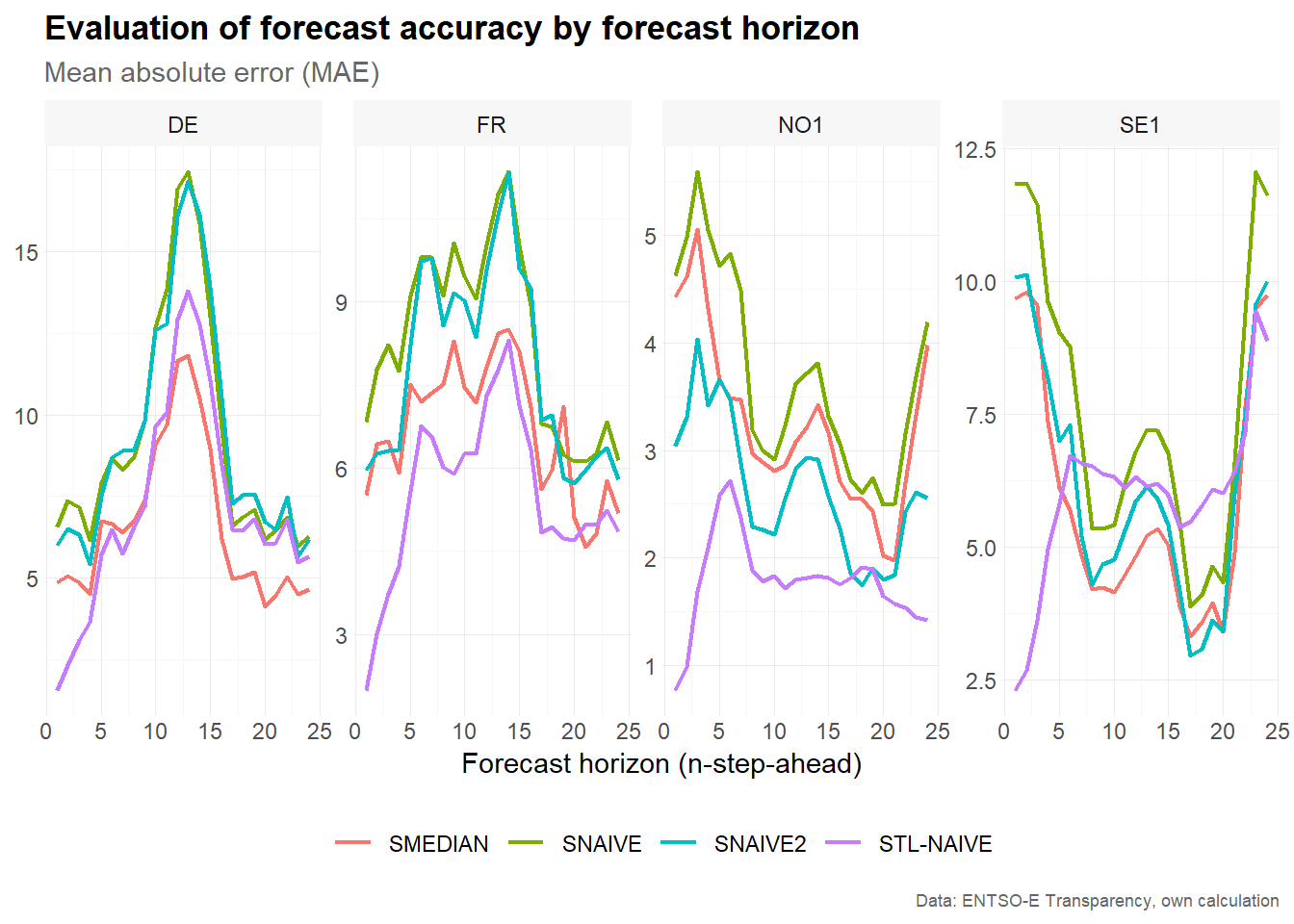
The resulting plot compares the mean absolute error across forecast horizons for each bidding zone and model. Increasing values indicate that forecasts become less accurate further into the forecast horizon. Differences between models show which benchmark performs best at different horizons.
Forecast accuracy by split
Accuracy by split is useful for identifying forecast origins where all models perform relatively well or poorly. This can reveal periods with unusual price behavior, such as strong volatility, negative prices or sudden price spikes.
# Estimate accuracy metrics by forecast horizon
accuracy_split <- make_accuracy(
  future_frame = future_frame,
  main_frame = main_frame,
  context = context,
  dimension = "split"
)

accuracy_split
#> # A tibble: 5,600 × 6
#>    bidding_zone model   dimension     n metric value
#>    <chr>        <chr>   <chr>     <int> <chr>  <dbl>
#>  1 DE           SMEDIAN split         1 MAE     2.80
#>  2 DE           SMEDIAN split         2 MAE     3.74
#>  3 DE           SMEDIAN split         3 MAE     2.70
#>  4 DE           SMEDIAN split         4 MAE     2.53
#>  5 DE           SMEDIAN split         5 MAE     4.54
#>  6 DE           SMEDIAN split         6 MAE     3.78
#>  7 DE           SMEDIAN split         7 MAE     4.38
#>  8 DE           SMEDIAN split         8 MAE     4.87
#>  9 DE           SMEDIAN split         9 MAE    11.5
#> 10 DE           SMEDIAN split        10 MAE     5.02
#> # ℹ 5,590 more rows

# Visualize results
accuracy_split %>%
  filter(metric == "MAE") %>%
  plot_line(
    x = n,
    y = value,
    facet_var = bidding_zone,
    facet_nrow = 1,
    color = model,
    title = "Evaluation of forecast accuracy by split",
    subtitle = "Mean absolute error (MAE)",
    xlab = "Split",
    caption = "Data: ENTSO-E Transparency, own calculation"
    )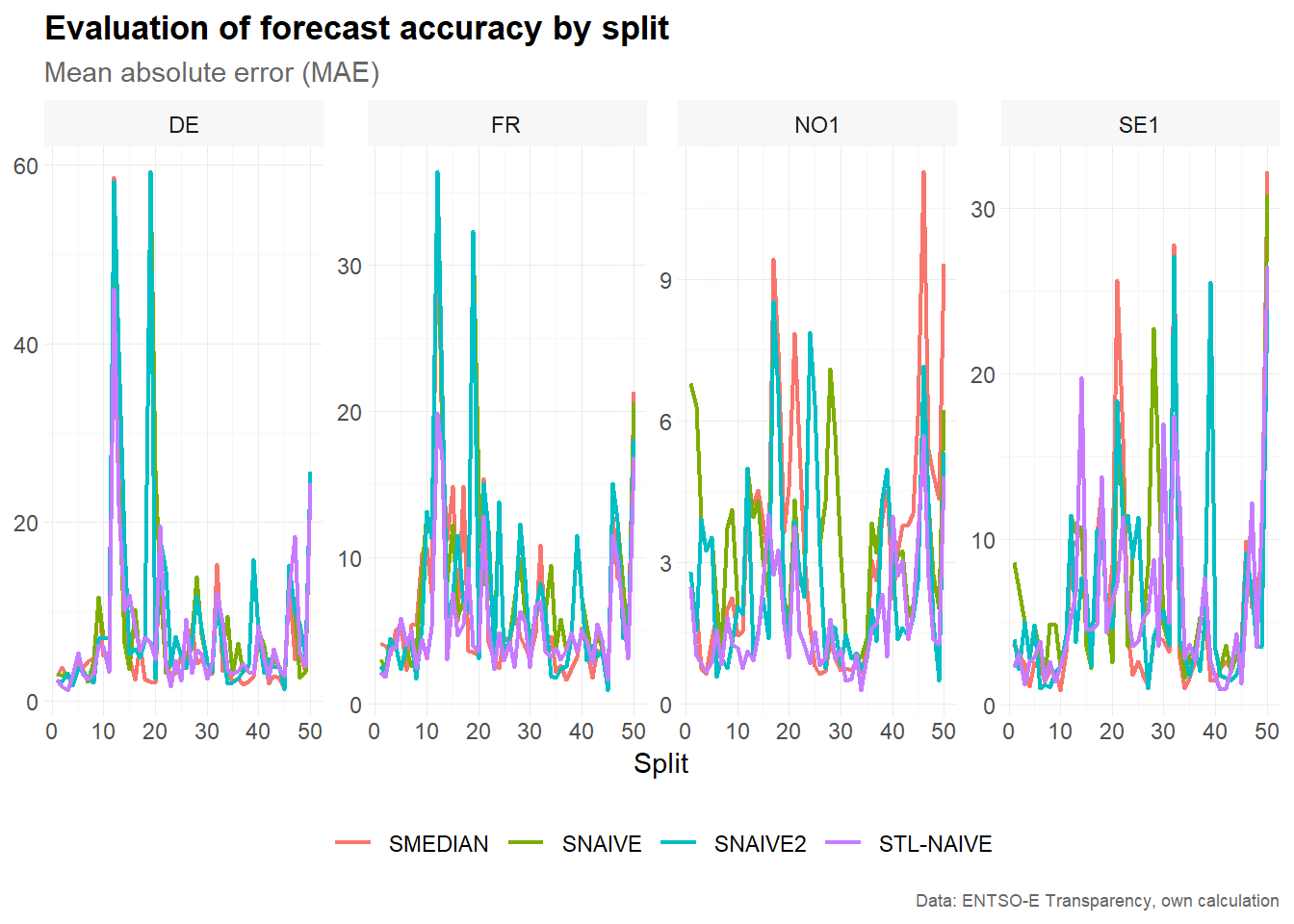
The resulting plot compares the mean absolute error across rolling-origin splits. Large error values for a particular split indicate that the corresponding 24-hour test window was difficult to forecast. Comparing models across splits helps assess whether forecast performance is stable over time.
Summary
This vignette demonstrated how to use tscv for time
series cross-validation with a fixed window approach. The workflow
consists of four main steps:
- Prepare the data and define the column context.
- Create fixed rolling-origin splits using
make_split(). - Estimate forecasting models separately for each time series and split.
- Evaluate forecast accuracy by horizon and by split.
The fixed window approach is useful when the training sample should represent a recent period of constant length. This can be particularly helpful for time series such as electricity prices, where seasonal patterns, volatility and market conditions may change over time.